Guide/Part One · Get started
Create, open & recent
Start a blank page, seed a formatted manuscript, or reopen something you were working on.
Create a document
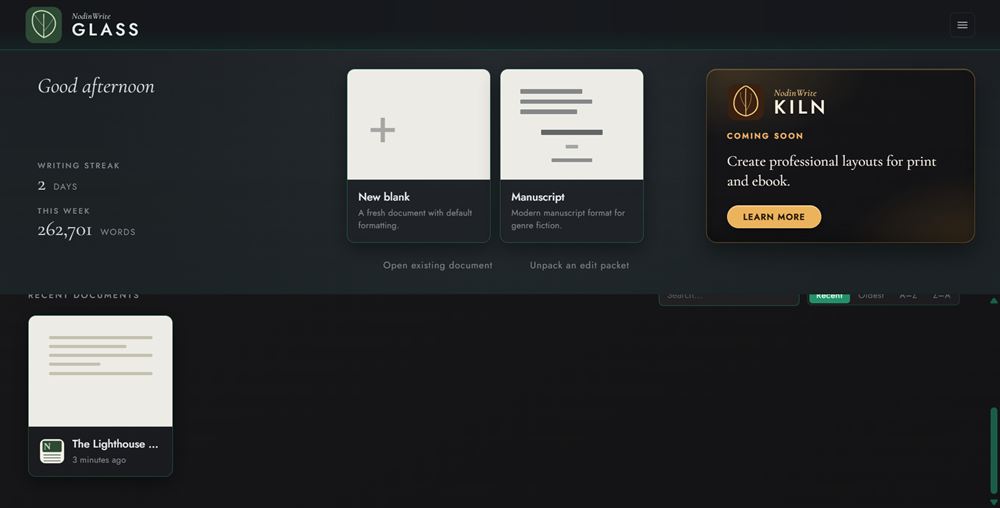
- On Home, click New blank for an empty document, or Manuscript for a Shunn-format template with a title block and running header already set up.
- GLASS opens the new document in Draft Mode, ready to type.
You can also press Ctrl+N / ⌘N at any time to create a blank document, or choose File ▸ New in Draft Mode.
Open an existing file
- On Home, click Open existing document. In Draft Mode, choose File ▸ Open. You can also press Ctrl+O / ⌘O at any time.
- Pick a
.glassfile. It opens in Draft Mode. (An editor's review copy opens in Review Mode. See How roles work.)
To bring in a Word document (.docx), a plain-text file (.txt), or a Markdown file (.md), see Import a document.
To reopen recent work, click any card under Recent documents on Home. Hover a card and click the × in its corner to remove it from the list (this never deletes the file).
Double-clicking a .glass file in your file manager opens it straight in GLASS.
When a file can't be opened
If GLASS can't open a file, it says why in plain words (the file was moved, the drive isn't connected, another program is using it) and what to do next. Details holds the technical message, which is useful if you contact support. If the file itself is damaged and GLASS has its backup from the previous save, it offers Open the backup copy. See Crash recovery.
A document saved by a newer version of GLASS opens read-only, with a banner naming that version. Update GLASS to edit it; the banner offers Install update when an update is waiting. Until then, nothing writes over the file (not Save, Save As, autosave, or an edit packet), so nothing the newer version added is lost. A document too new to open at all says so. Keep GLASS up to date on every computer you use.